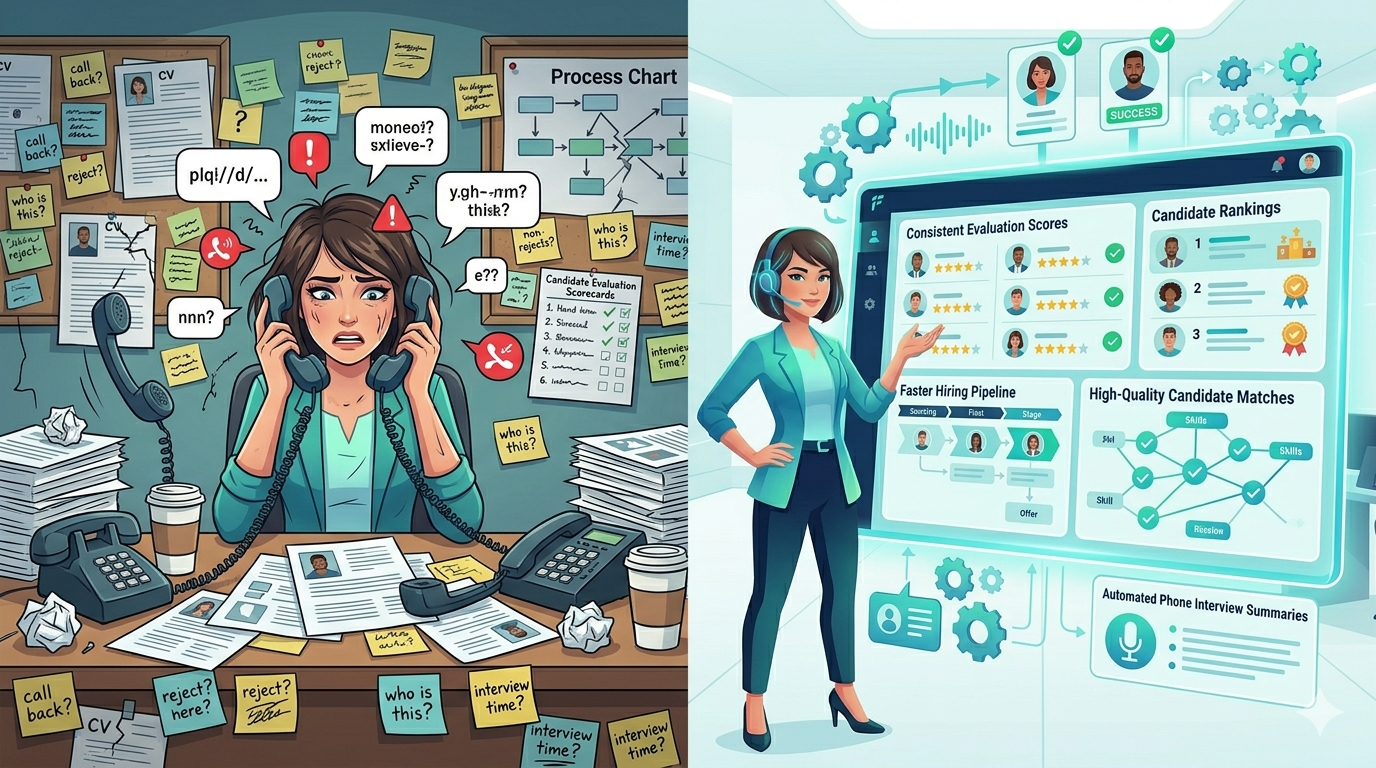
Phone screening is eating your week. A recruiter makes 200 calls per month, averaging 3 to 5 minutes per conversation. That’s 10 to 15 hours of their calendar dedicated to conversations that follow the same script every time. Add in no-shows, follow-ups, and callbacks, and phone screening becomes one of the biggest bottlenecks in your hiring process.
The frustration runs deeper than just time. Manual phone screening creates inconsistency. One recruiter asks five structured questions. Another covers only three before running out of time. Some candidates get a thorough evaluation. Others get a quick gut check. That inconsistency shows up in hiring quality.
There’s another problem: candidates hate phone screening. They get a call with no notice, they schedule a callback and forget about it, or they’re checking email during the conversation. High-quality candidates often ghost during the screening phase because the process feels slow and impersonal.
This is where phone screening automation changes the game. You don’t have to choose between speed and quality. Automated phone screening lets you screen more candidates consistently, faster, and with a better candidate experience.
What Is Phone Screening Automation?
Phone screening automation uses AI to conduct initial candidate conversations automatically. Instead of your recruiters making outbound calls, an AI voice recruiting assistant calls candidates, asks a standard set of structured questions, evaluates responses, and documents the results.
The process works like this: a candidate applies to a job or enters your pipeline. The system automatically calls them at a time you’ve configured (or that they’ve selected). The AI asks your screening questions conversationally. It listens to answers, follows up when needed, and collects the information you need to move candidates forward.
The AI doesn’t just record answers. It evaluates them. It flags candidates who meet your criteria, identifies red flags, and passes information directly into your ATS or recruiting platform. Your recruiter receives a summary instead of spending an hour making calls to reach five candidates.
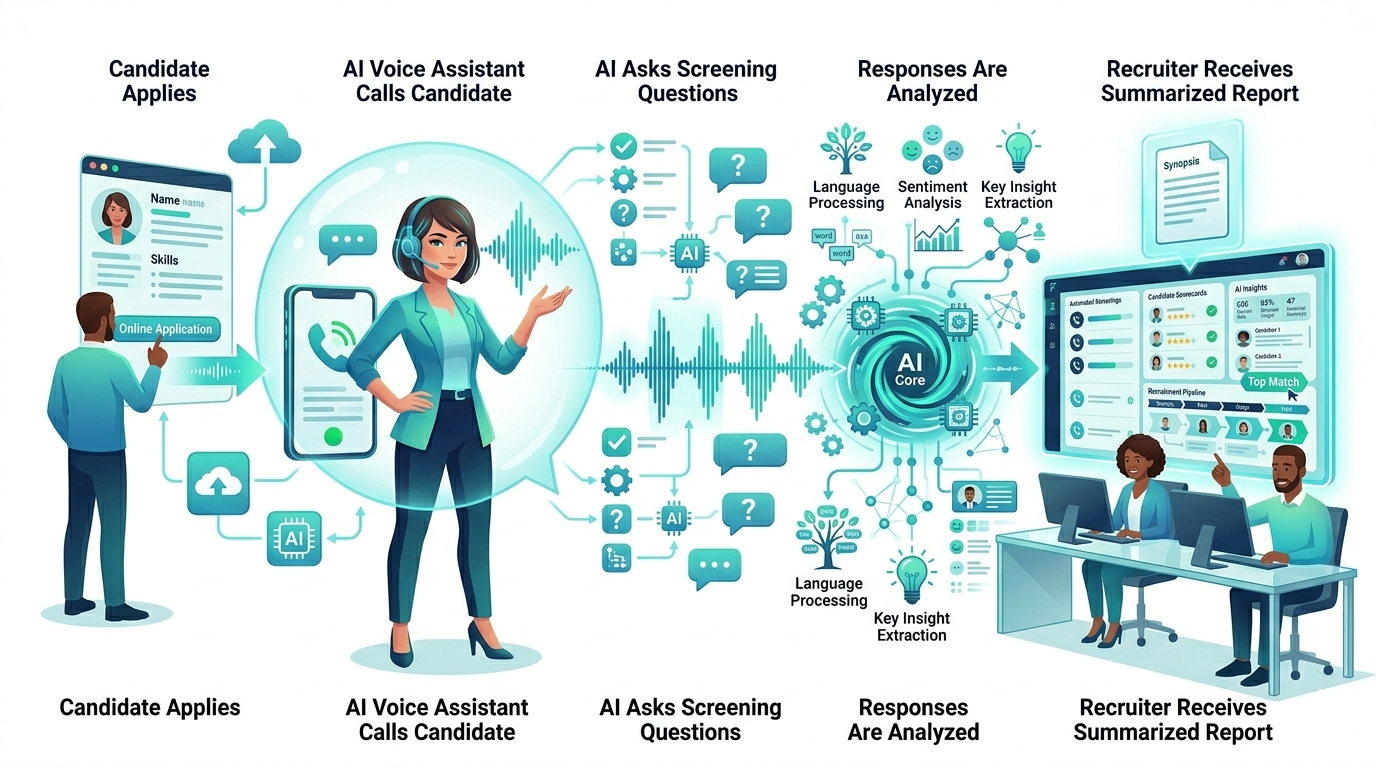
This is different from robocalls. Phone screening automation uses conversational AI that sounds natural, responds to what candidates say, and actually engages them in a real dialogue.
Why Phone Screening Automation Actually Improves Candidate Quality
Recruiters often worry that automating phone screening will hurt candidate quality. The opposite usually happens.
Consistency matters more than you think. When every candidate hears the same questions asked the same way, you get comparable data. You’re not choosing candidates based on who answered when your recruiter was having a good day. You’re comparing apples to apples. Structured questioning reduces unconscious bias and ensures candidates with the right qualifications don’t slip through because a recruiter was rushed.
You can be more thorough. Automated screening lets you dig deeper with every candidate. You can ask more questions, explore answers more carefully, and follow up on unclear responses without worrying about the call time. Your best candidates get a better evaluation, not a faster brush-off.
Screening happens faster, which improves quality downstream. If you can screen 100 candidates in the time it took to screen 20, you move qualified people through your process faster. Fast-moving processes have lower candidate dropout rates. High-quality candidates don’t ghost when they feel momentum.
Candidate experience improves because it’s on their schedule. Automated screening calls can be sent on a candidate’s preferred schedule, with flexible timing. No more “is now a good time to talk?” No more rescheduled calls. Candidates appreciate control over when they participate.
The Main Benefits for Your Team
Time savings. A recruiter handling phone screening manually might spend 10 to 15 hours per week just making calls and logging responses. Automated screening cuts that to near zero. Your team gets hours back every single week.
Cost reduction. If you’re paying recruiters $60,000 to $80,000 a year, you’re paying roughly $30 to $40 per hour on phone screening labor. Multiply that by dozens of calls per recruiter per week and the cost adds up fast. Automation reduces that cost significantly.
Faster hiring. When screening happens automatically and immediately after application, your time-to-hire drops. Candidates move through your process faster because there’s no wait between application and initial screening.
Better recruiter productivity. Recruiters hate phone screening. It’s repetitive, it takes time, and it doesn’t let them do the relationship building that actually closes offers. Automating phone screening frees up your team to focus on sourcing, building candidate relationships, and selling jobs to strong candidates.
Reduced no-shows. Candidates are more likely to engage with a scheduled call if they opted into the timing and have visibility into what to expect. This reduces the “I forgot about the call” problem.
How Phone Screening Automation Works in Practice
Here’s what the process looks like from start to finish.
Step 1: Set up your screening questions. You define the questions that matter for each role. These are usually your standard phone screening questions: background fit, availability, compensation expectations, experience with specific tools, willingness to relocate, or other must-haves. Keep it to 5 to 8 questions so the conversation stays focused.
Step 2: Configure candidate triggers and timing. You decide when candidates get called. Some companies trigger automated screening right after application. Others wait until a recruiter has done a resume review. You can also let candidates self-select a time that works for them.
Step 3: The AI calls candidates. On the scheduled date and time, the system initiates automated calling. The AI introduces itself, explains the call, and begins asking your questions.
Step 4: The AI listens, evaluates, and documents. The AI listens to responses, asks follow-up questions when needed (like “can you tell me more about that?”), and documents everything. It doesn’t just record the call. It actually evaluates answers against your criteria.
Step 5: You get a summary and next steps. After the call, you get a report that includes the candidate’s responses, the AI’s assessment, and a clear recommendation: move forward, consider alternative role, or pass. This summary goes into your ATS.
Step 6: Your team acts on the results. Strong candidates move forward to next round. Others get automated follow-up (like an email invitation to schedule with a recruiter, or a rejection). Everything is documented and ready for your team to act on.
What to Look for in an Automated Phone Screening Solution
Not all phone screening automation is the same. When you’re evaluating options, focus on a few things.
Conversational quality. The AI should sound natural, not robotic. It should handle follow-ups, understand context, and engage candidates like a real person would. Poor quality audio or awkward phrasing damages your employer brand.
Integration with your existing tools. The system should connect with your ATS, your career site, and your recruiting workflows. You don’t want manual data entry or disconnected systems.
Question flexibility. You need to be able to customize questions for different roles and update them as needs change. A locked-in template won’t work long-term.
Candidate experience controls. You should be able to let candidates choose call times, opt out if they prefer, and control how they’re reached. Respecting candidate preferences matters.
Quality of evaluation. The AI assessment shouldn’t just record answers. It should actually evaluate them against your criteria. You should get clear recommendations, not just transcripts.
Compliance and security. The system should handle data securely, comply with employment law, and make it easy for candidates to understand what’s happening during a call.
How Phone Screening Automation Fits Into Your Workflow
Automated phone screening works best when it’s part of a larger recruiting process, not a replacement for all human judgment.
A typical workflow looks like this: candidates apply through your career site or job board. A recruiter does a quick resume review to filter for basic fit. Candidates who pass that review get an automated phone screening. The AI assessment helps your recruiter prioritize candidates for deeper interviews. Recruiters then focus on relationship building, selling the role, and closing offers.
This approach gets you the best of both worlds. Automation handles the repetitive, time-consuming part of screening. Your recruiters handle the relationship and decision-making parts where human judgment matters.
Some teams also use an AI chat assistant to engage candidates between the phone screening and next interview stage. An AI chat assistant can schedule the next interview, answer common questions, and keep candidates engaged. This keeps momentum going and improves your candidate experience overall.
If you want to see how this workflow fits your recruiting process, an applicant journey assessment can help identify your biggest bottlenecks and opportunities.
Common Mistakes When Automating Phone Screening
Automating phone screening is straightforward, but a few common mistakes can slow your results.
Launching with too many questions. More questions sounds like you’ll get better data, but it just extends the call time and increases no-shows. Start with 5 to 7 questions. You can add more as you learn what matters.
Not letting candidates opt in to timing. If you only call candidates at times that work for you, you’ll have higher no-show rates. Let candidates select a time or at least give them a choice between two windows.
Ignoring quality red flags. Automation gives you consistent data, but you still need to interpret it. Don’t let a strong resume override a bad phone screening assessment. The automation is meant to help your judgment, not replace it.
Setting it and forgetting it. Automated screening still needs monitoring. You should check in regularly to make sure the questions are still relevant, the AI is working well, and candidates are responding positively.
Treating automation as the final decision. Phone screening automation is meant to help you prioritize and move candidates forward faster. It’s not meant to be a final “yes” or “no.” Your recruiters should still talk to top candidates to build relationships.
Key Metrics to Track
If you’re automating phone screening, track these metrics to see if it’s working.
Completion rate. What percentage of candidates actually complete the automated screening call? Low completion rates mean you need to adjust timing, question count, or communication about the process.
No-show rate. How many candidates get called but don’t answer? This tells you if your timing windows are working.
Time-to-hire. Are you moving candidates through screening faster? This should drop noticeably once automation is working.
Recruiter hours freed up. How many hours per week did your team get back? This directly impacts your team’s ability to focus on higher-value work.
Assessment consistency. Are assessment ratings for similar candidates consistent across the board? This tells you if automation is delivering on the consistency promise.
Candidate satisfaction. Are candidates leaving positive feedback about the screening experience? You can ask directly in follow-up surveys.
Putting Phone Screening Automation to Work
Automating phone screening is one of the highest-leverage changes you can make to a recruiting workflow. It takes one of the most time-consuming parts of your recruiter’s day and turns it into a consistent, fast, candidate-friendly process.
The key is to see it as part of your overall recruiting strategy, not as a standalone tool. Pair it with smart recruiting chat for candidate engagement, and you create a process where early-stage candidates move through your pipeline faster, more consistently, and with a better experience.
If you want to see how phone screening automation fits into your specific recruiting process, Talent Frequency offers a free AI consultation to map your candidate journey and identify your biggest bottlenecks. You can also request a demo to see the system in action and understand how it works with your current recruiting tools.
FAQ
Q: Will automating phone screening hurt my employer brand?
A: No, if it’s done right. Candidates generally appreciate the convenience of scheduled calls that fit their calendar. The key is transparent communication (tell candidates upfront that an AI will be calling), a natural-sounding conversation, and quick follow-up from a human recruiter for candidates who pass screening. Most candidates view automated screening as more respectful of their time than no-show calls or long waits between application and first contact.
Q: What happens if a candidate disagrees with the AI’s assessment?
A: The assessment is a recommendation, not a final decision. Your recruiter should always review the call recording and assessment before making a final decision. If a candidate’s answers were misinterpreted, the recruiter can override the assessment and move the candidate forward. Transparency matters here: if a candidate asks why they didn’t move forward, you should be able to explain it clearly.
Q: Can I automate phone screening for all roles or only some?
A: You can automate phone screening for any role where you have consistent screening questions. Entry-level roles, high-volume positions, and standardized screening criteria are ideal candidates. For highly specialized or senior roles where your screening is more nuanced, automation might work for the initial round but less so for deeper interviews. Most teams start with high-volume roles and expand from there.
Q: How long does it take to implement phone screening automation?
A: Implementation is usually fast. You need to define your screening questions (1 to 2 hours), set up your system (1 to 2 hours), and test a few calls (30 minutes). You can have your first automated screened call running within a day or two. Full team adoption and optimization usually takes 2 to 4 weeks as you refine questions and timing based on real results.
Q: Do I need a separate tool or can my ATS do this?
A: Most traditional ATS platforms don’t offer good conversational AI phone screening. Specialized recruiting automation tools usually handle this better because they’re built specifically for the candidate conversation. Look for tight integration with your ATS so data flows automatically between the phone screening tool and your recruiting platform.
Q: What if candidates don’t pick up the phone?
A: This is the biggest challenge with phone screening automation. Most systems handle this with follow-up calls, voicemail drops, or SMS reminders. Some let candidates self-schedule the call time (instead of your system calling them), which increases answer rates significantly. The best approach is usually a combination: let candidates choose timing when possible, use reminder notifications, and follow up if they miss a call.